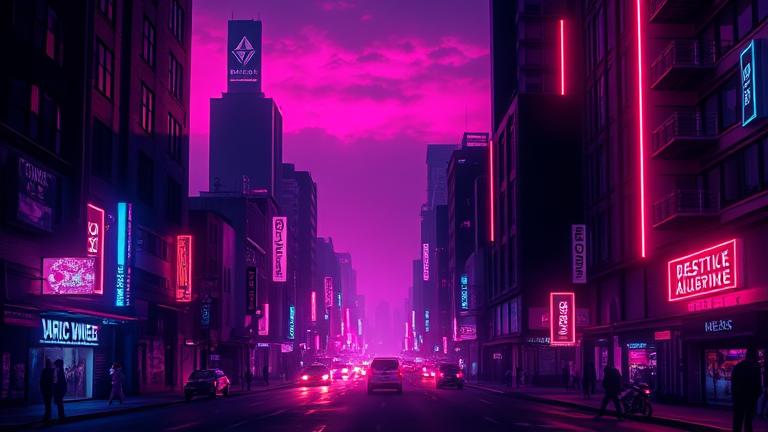
AI Album Cover Generator
The best free way to design unique, high‑res album covers in minutes
Launch stunning cover art in minutes with the AI Album Cover Generator on story321.com. Describe your vibe, pick a style, and get high‑res, platform‑ready art without design skills. It’s the best free starting point for musicians who want fast, original, and commercially usable visuals.

AI Album Cover Generator
What is the AI Album Cover Generator?
The AI Album Cover Generator is your fast track to professional, original cover art. Built for artists, producers, and labels, it translates your genre, mood, and story into striking visuals in just a few clicks. Unlike generic image tools, the AI Album Cover Generator guides your prompt, adapts to your music style, and outputs square, high‑resolution images optimized for streaming platforms. You can fine‑tune palettes, composition, and typography areas, iterate until it feels right, and export clean, watermark‑free files on paid plans. Whether you need a gritty hip‑hop single sleeve, a dreamy lofi EP cover, or a cinematic synthwave album image, the AI Album Cover Generator delivers speed, control, and quality—without the agency invoice.
High‑res, square exports for Spotify, Apple Music, and print
Style presets tuned for genres: hip‑hop, EDM, rock, lofi, metal, pop, jazz
Prompt helper to turn themes into vivid, visual directions
Features made for music creators
From genre‑aware styles to export‑ready files, the AI Album Cover Generator combines smart defaults with deep customization so your cover looks intentional, not accidental.
Genre‑aware style presets
Pick presets crafted for hip‑hop grit, synthwave neon, indie film grain, metal textures, or pop gloss. The AI Album Cover Generator adapts palettes, lighting, and contrast per genre.
Prompt helper and examples
Turn your themes—like heartbreak, late‑night drive, or cyberpunk city—into vivid visual prompts. The AI Album Cover Generator suggests phrasing and reference styles to reduce guesswork.
High‑resolution exports
Export 3000×3000 px at 300 DPI in PNG or JPG. The AI Album Cover Generator ensures clean edges, readable title space, and print‑friendly color profiles.
Typography‑ready layouts
Reserve negative space for titles or logos. The AI Album Cover Generator offers grid overlays and safe zones so text remains legible across platforms and thumbnails.
Batch and variations
Generate multiple angles from one prompt. The AI Album Cover Generator lets you iterate fast, starring your favorites and refining the best direction.
Smart editing tools
Tweak color grading, grain, contrast, and crop. Add artist and album text with modern font pairings. The AI Album Cover Generator keeps edits non‑destructive.
Watermark‑free on paid
Try concepts free. Upgrade for watermark‑free downloads and full‑res exports with the AI Album Cover Generator.
API for workflows
Automate cover creation for catalogs or releases. The AI Album Cover Generator provides developer‑friendly endpoints for seamless pipeline integration.
How to use the AI Album Cover Generator
Create a polished cover in minutes—no design background required. Bring your mood, a few keywords, and let the AI Album Cover Generator do the heavy lifting.
Describe your music
Enter genre, mood, key themes, and visual influences. Examples: 'moody lofi night rain', 'aggressive trap chrome skulls', 'dream pop pastel clouds.' The AI Album Cover Generator expands this into a strong prompt.
Choose a style preset
Select presets like Synthwave Neon, Indie Film, Dark Trap, or Minimal Pop. The AI Album Cover Generator adjusts palettes, contrast, and texture to match.
Generate and compare
Create several concepts at once. The AI Album Cover Generator highlights variations with different compositions, lighting, and focal points.
Refine and add text
Adjust color, grain, and crop; add artist and album title using safe zones. The AI Album Cover Generator ensures readability at thumbnail sizes.
Export platform‑ready
Download 3000×3000 PNG/JPG at 300 DPI. The AI Album Cover Generator provides clean, watermark‑free files on paid plans and clear naming for your release pipeline.
Tips for better results
- •Use emotional keywords: melancholic, euphoric, gritty, nostalgic.
- •Pair a palette with a mood: neon magenta/teal for synthwave, warm sepia for folk.
- •Mention composition: centered portrait, wide skyline, minimal abstract.
- •Reserve negative space for titles; keep key subjects off edges.
- •Iterate: lock a favorite, then tweak color and lighting for cohesion.
- •For print, export at 300 DPI and verify bleed requirements.
Commercial use is available on paid plans of the AI Album Cover Generator; always review current licensing terms, especially for merchandising and third‑party fonts.
What you can make with the AI Album Cover Generator
Whether it’s a debut single or a deluxe edition, the AI Album Cover Generator adapts to your release and brand.
Single cover art
Quickly craft bold, scroll‑stopping square images for singles. The AI Album Cover Generator emphasizes high contrast and clear title space.
EP and album suites
Create a visual series with consistent tones. The AI Album Cover Generator lets you reuse palettes and motifs across multiple tracks.
Genre branding
Match visual identity to hip‑hop, EDM, rock, folk, or jazz aesthetics. The AI Album Cover Generator aligns palettes and textures to each scene.
Podcast and playlist art
Design square covers that look crisp in feeds. The AI Album Cover Generator builds clear layouts that pop at tiny thumbnail sizes.
Vinyl and merch visuals
Export high‑res artwork suitable for print. The AI Album Cover Generator keeps detail intact for sleeves, inserts, and apparel mockups.
Social teasers and ads
Generate alternates for stories, reels, and ad creatives. The AI Album Cover Generator maintains brand color and mood across sizes.
Label catalogs
Automate cohesive covers at scale with API support. The AI Album Cover Generator helps labels prototype fast.
Rebrand or refresh
Evolve your look between releases. The AI Album Cover Generator gives you new directions without losing your core identity.
AI Album Cover Generator FAQs
Answers to the most common questions about speed, quality, rights, and workflows with the AI Album Cover Generator.
Can AI really create a good album cover?
Yes. The AI Album Cover Generator blends genre‑aware presets, cinematic lighting, and curated color science to produce intentional images, not random noise. You guide the mood and composition, then iterate until it fits your music.
Is it free?
You can start free to generate concepts with the AI Album Cover Generator. Paid plans unlock watermark‑free, high‑resolution exports, batch creation, and commercial‑use licensing.
Do I own the art and can I use it commercially?
On paid plans, you receive commercial‑use rights to the outputs you create with the AI Album Cover Generator, subject to published terms. Always review licensing details for streaming, merch, and any third‑party fonts you add.
Will my cover look like everyone else’s?
The AI Album Cover Generator combines your prompt, style preset, and random seeds to generate unique results. You can further customize palettes, textures, and layout to ensure your cover stands apart.
What resolution and formats are available?
Export 3000×3000 px at 300 DPI in PNG or JPG. The AI Album Cover Generator also supports smaller social sizes via non‑destructive cropping.
Can I add text or logos?
Yes. Use the built‑in text tool with safe zones and grid overlays. The AI Album Cover Generator supports custom fonts, kerning, and contrast checks for small thumbnails.
How do I make the art match my music?
Describe emotion, tempo, era, and imagery—like 'nocturnal synthwave, neon reflections, city rain'—then choose a matching preset. The AI Album Cover Generator translates that language into visual rules.
Are there watermarks?
Free renders may include a small watermark. Paid plans of the AI Album Cover Generator provide clean, watermark‑free downloads and original‑size exports.
Can teams or labels collaborate?
Yes. Create shared libraries of palettes and presets. The AI Album Cover Generator supports versioning and favorites so A&R, artists, and designers stay aligned.
Is there an API?
Yes. Automate cover creation at scale using the AI Album Cover Generator API to generate, version, and export assets directly in your release pipeline.
Design your cover in minutes
Start with a free concept, then export HD, watermark‑free art when you’re ready. The AI Album Cover Generator makes pro visuals fast, flexible, and affordable.
By generating art, you agree to our terms. Commercial use is available on paid plans of the AI Album Cover Generator; always verify rights for distribution and merch.