Dimensional art, connected character details

3D Character Generator for Character Art & Profiles

Turn an idea into dimensional character art and an editable personality with Story321's 3D character generator. Describe a silhouette, materials, and lighting to request a 3D-rendered look. Your output is a character image and profile; mesh files, rigging, and animation are outside this tool's output.

Create Character ArtSee How It Works

Sign in to generate · 9 credits per character · 12 credits per variation. Selecting an example uses no credits.

Character Studio

Turn a story idea into a reusable visual character and an editable character bible.

0/2000
Try a character concept

Selecting an example replaces your current brief, role, and art style. Review the prompt before generating.

Cost9 credits

Log in to generate and save your character.

Visual identity

Your character portrait will appear here.

Character DNA

Generate a character to edit their narrative DNA.

3D Character Generator Prompt Examples

Explore three visual directions for your 3D character generator brief. Choose a concept to fill the prompt, story role, and cinematic style, then adapt the details before generating your own image.

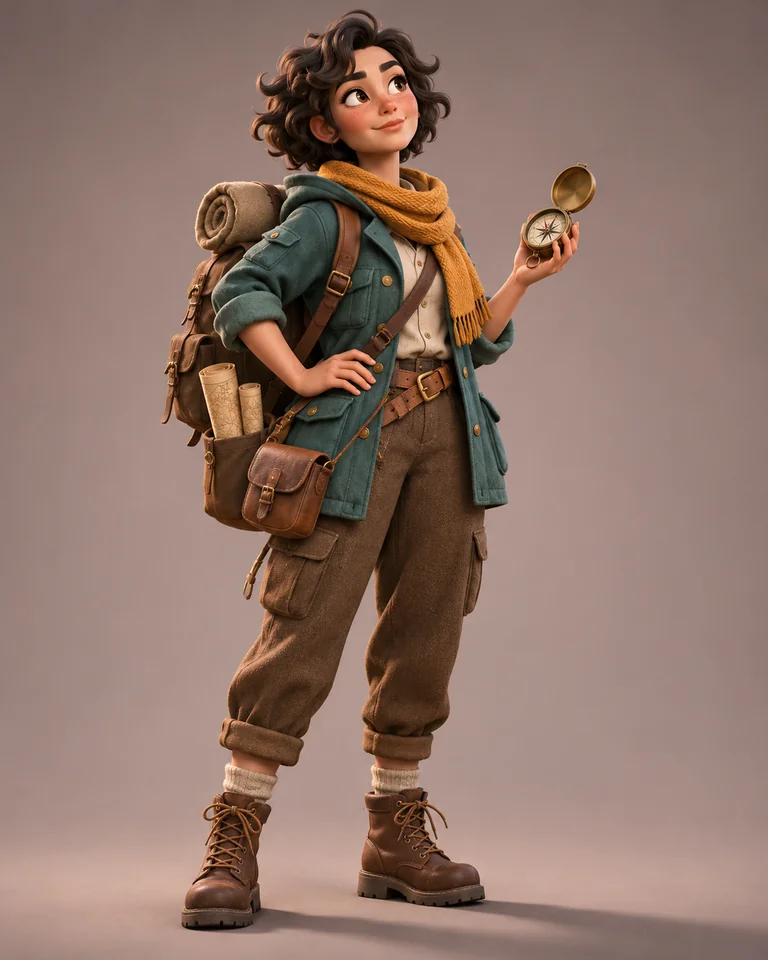
Full-body cartoon adventurer with curly hair, a teal jacket, an ochre scarf, and a brass compass in a dimensional render style.

Cartoon adventurer: rounded forms

An adult cartoon adventurer with short curly dark hair, a teal expedition jacket, an ochre scarf, brown hiking boots, and a brass compass. A patient mapmaker searching for a lost island, curious but afraid of making the wrong choice. Single full-body character, cinematic 3D-rendered appearance, rounded silhouette, matte woven clothing, soft key light and subtle rim light, simple warm-gray studio background, no text.
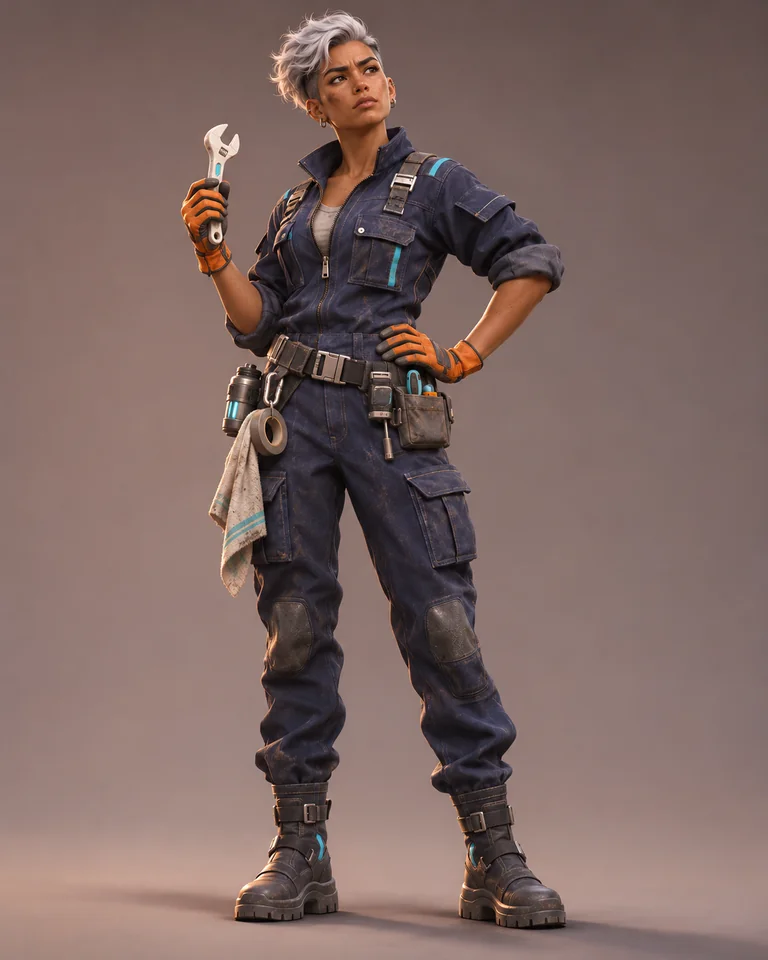
Full-body spacecraft mechanic with silver hair, navy coveralls, orange gloves, and a service wrench against a simple studio background.

Sci-fi mechanic: material contrast

An adult spacecraft mechanic with copper skin, a short silver undercut, navy coveralls, orange gloves, a compact tool belt, and a ceramic service wrench. Resourceful but impatient, determined to bring a stranded crew home. Single full-body character, cinematic 3D-rendered appearance, practical silhouette, matte fabric and brushed metal fasteners, restrained cyan accents, soft key light and subtle rim light, simple warm-gray studio background, no text.

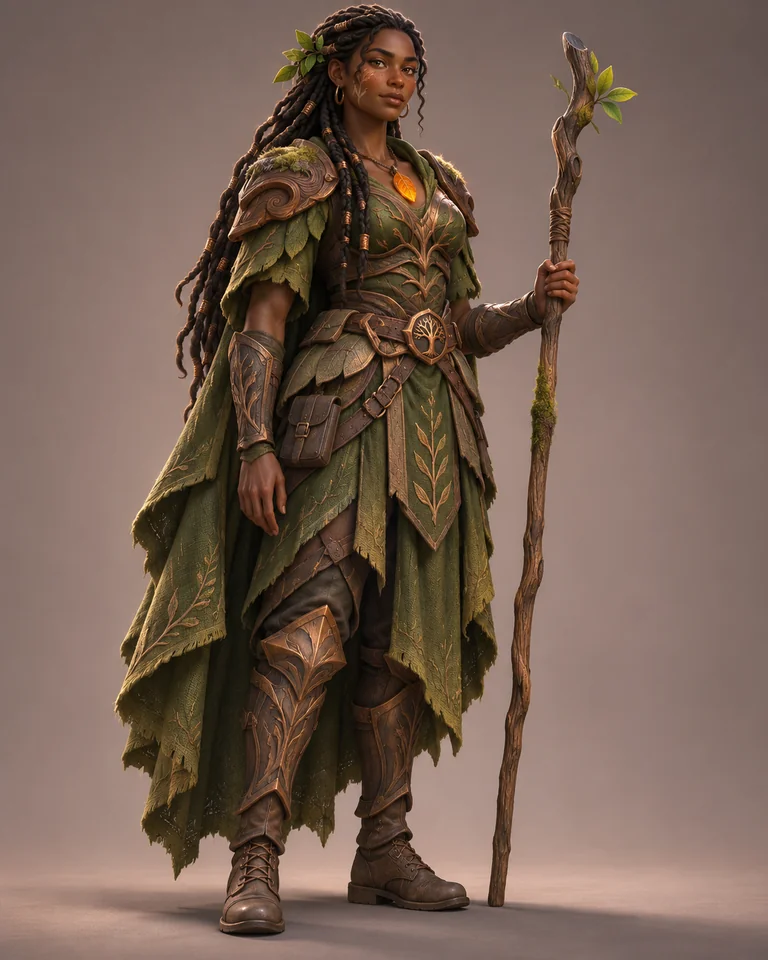
Full-body fantasy guardian with dark braids, layered wood and bronze armor, an amber pendant, and a wooden staff.

Fantasy guardian: tactile surfaces

An adult forest guardian with deep brown skin, long dark braids, moss-green armor made from sculpted wood and weathered bronze, an amber leaf pendant, and a wooden staff. A loyal protector learning to trust an outsider, calm but guarded. Single full-body character, cinematic 3D-rendered appearance, readable silhouette, tactile wood grain, soft key light and subtle rim light, simple warm-gray studio background, no text.

What Does This 3D Character Generator Create?

Story321's 3D character generator creates a still image with a requested sense of depth, plus editable Character DNA. Light, surface texture, and rounded forms suggest volume within the image. Use the result to explore a look and a personality before developing a scene or creative brief.

A visual concept

Request a full-body portrait with a clean background, then review its anatomy, outfit, and lighting.

An editable character profile

Develop appearance alongside personality, flaws, desire, fear, voice, and story function.

A reference for revisions

Choose a reference image and request changes to an outfit, expression, or setting.

How to Use the 3D Character Generator

Give the 3D character generator one clear subject and a specific visual direction.

1

1. Describe the person and purpose

Start your 3D character generator brief with a role, goal, visible anchors, and one obstacle. Choose a prompt example or write your own.

2

2. Request the dimensional look

Keep cinematic selected. Add full-body framing, a 3D-rendered appearance, material contrast, soft lighting, and a simple background. Generation uses 9 credits.

3

3. Review the art and Character DNA

Check the image and edit the profile. Select a reference before requesting a variation; each variation uses 12 credits.

Write a More Useful 3D Character Generator Prompt

A useful 3D character generator prompt describes the subject before adding render language. In the 3D character generator, connect visible choices to the character's role.

Build the brief

Role and goal + visual anchors + silhouette + wardrobe and materials + expression + full-body framing + 3D-rendered appearance + lighting + simple background.

Too broad

A cool fantasy character in 3D.

A clearer direction

An adult forest guardian protecting a hidden village, long dark braids, moss-green wooden armor, amber pendant, wary expression. One full-body character, cinematic 3D-rendered appearance, tactile wood grain, soft side lighting, simple studio background.

Make the silhouette readable
Tell the 3D character generator which shapes matter: broad shoulders, a short cape, or a rounded backpack. Keep props separate from the body.
Name contrasting materials
Pair matte fabric with brushed metal or textured wood. Give the 3D character generator surface cues instead of stacking quality adjectives.
Choose a lighting direction
Request soft side lighting or a gentle rim light. Review whether shadows support depth without hiding the face.
Keep identity anchors stable
When revising, preserve hair, wardrobe colors, and a signature prop. Change one feature and review the whole result for drift.

Refine One Detail at a Time

Select your strongest 3D character generator image as the reference before making a targeted revision.

Change the expression

Keep the same face, curly hair, teal jacket, ochre scarf, compass, full-body framing, and dimensional render style. Change only the expression to cautious curiosity.

Keep the visual anchors and lighting direction.

Review the face, hands, and compass after the change.

Change the surface finish

Keep the same guardian, face, dark braids, armor shapes, amber pendant, staff, and pose. Give the bronze armor fittings a more weathered finish while preserving the cinematic dimensional look.

Keep identity, armor shape, and pose.

Review whether the finish changed without losing the original silhouette.

What the 3D Character Generator Includes

Develop the look and the story in one workspace.

Character image generation

The 3D character generator requests one original, full-body character image from your brief.

Editable Character DNA

Review personality, motivation, appearance, voice, flaws, and arc alongside the art.

Reference-based variations

Use the 3D character generator reference workflow to explore a focused visual change.

Saved character details

Save your edited profile and selected reference, then download the active image.

3D Character Generator Output and Credits

Know what you receive before starting a 3D character generator brief.

  1. Still character art

    The image request uses 1024 × 1280 pixels in a 4:5 portrait layout. Review framing and detail before downloading.

  2. A profile you can edit

    The 3D character generator pairs the art with editable physical details, traits, motivation, voice, and story role.

  3. Image and profile output

    The 3D character generator does not export GLB, FBX, OBJ, or STL files, geometry, skeletons, or animation clips.

  4. Plan a revision budget

    A character uses 9 credits; a variation uses 12. One character plus two variations totals 33 credits.

Choose a 3D Character Generator Art Direction

Use these directions to make different surface and silhouette choices within a 3D character generator prompt.

Prompt choice
Cartoon adventurer
Sci-fi mechanic
Fantasy guardian
Silhouette
Rounded, compact forms
Practical outfit and tool belt
Layered armor and upright staff
Materials
Matte cloth and warm leather
Fabric and brushed metal
Wood grain and weathered bronze
Lighting
Soft key and gentle rim
Soft key with restrained accents
Soft side light on texture
Review focus
Expression and readable props
Hands, tools, and fasteners
Armor edges and staff placement

Where 3D Character Generator Art Fits

Use a 3D character generator concept when you need a visual direction and a person behind it.

Story and comic planning

Connect a protagonist's appearance with their fear, flaw, and next decision.

Game character briefs

Use 3D character generator art as a visual reference for an NPC or companion concept during planning.

Animation concept development

Explore silhouette, expression, and costume with 3D character generator art before handing a design direction to artists.

3D Character Generator FAQ

Answers about output, style, revisions, and 3D character generator credits.

Does this 3D character generator create a real 3D model?

Story321 creates a still character image and an editable profile. The dimensional appearance comes from the requested visual style. This tool does not create editable mesh geometry or export GLB, FBX, OBJ, or STL files.

Can the 3D character generator rig or animate a character?

No. The 3D character generator produces character art and profile details. Rigging, animation, and engine-ready assets require a separate production workflow.

How do I request a 3D-rendered look with the 3D character generator?

Keep cinematic selected and describe rounded forms, specific materials, soft key lighting, and a simple background. Review the 3D character generator result and refine details that do not match your brief.

Can I keep the same character while changing an outfit?

Select a reference image, then request an outfit variation while preserving facial features, hair, colors, and signature props. Review each result; visual consistency is not guaranteed.

Is the 3D character generator free?

Selecting a prompt example uses no credits. Sign in to generate: a character costs 9 credits and a variation costs 12 credits. Check the pricing page for available plans.

What can I edit and download in the 3D character generator?

Download the active character image. Edit and save the character's name, summary, personality, appearance, motivation, voice, story function, and arc in the profile editor.

Start Your 3D Character Generator Brief

Choose a visual direction, describe the person behind it, and use the 3D character generator to create art with an editable profile. Review the result, choose a reference, and refine one detail at a time.