AI Podcast Generator for Two-Host and Solo Episodes
Turn a topic, pasted text, Story321 work, or PDF into an editable two-host conversation or solo narration, then export MP3, cover art, Show Notes, and a creator pack.
What Is an AI Podcast Generator?
An AI podcast generator turns written material into editable narration. Story321 connects planning with AI voice creation, so the AI podcast generator keeps you in editorial control.
Idea-to-episode planning
Organize a subject into an opening, clear segments, transitions, and a closing.
Text-to-podcast workflow
Convert notes, scripts, lessons, or articles into listenable narration.
Flexible AI voices
Test delivery styles for explainers, stories, lessons, or updates.
Creator-led revision
Review facts, pronunciation, pacing, and tone before publishing.
Explore Podcast Creation Workflows
Choose the source format that matches the material you want to turn into reviewed audio.
Text to Podcast
Turn pasted text, articles, or scripts into editable podcast audio.
Convert Text to PodcastPDF to Podcast
Extract readable document text, edit the script, and create reviewed audio.
Convert PDF to PodcastStory to Podcast
Adapt an approved story into editable solo or two-host podcast audio.
Turn Story Into a PodcastPodcast Script Generator
Create an editable solo or two-host podcast script from a topic or source.
Generate a Podcast ScriptTechnical Specifications
Verifiable product limits, supported options, usage costs, and output details for the Story321 AI Podcast Generator.
| Specification | Details |
|---|---|
| Input types | Topic, pasted text, Story321 document, PDF |
| Topic limit | 500 characters |
| Text limit | 30,000 characters |
| PDF limit | 10 MB, 50 pages, up to 30,000 extracted characters |
| Episode formats | Two-host dialogue, solo narration |
| Target durations | 3, 5, 10 minutes |
| Languages | 9 selectable languages plus auto detect |
| Voices | 10 selectable AI voices |
| Script editing | Up to 200 segments and 5,000 characters per segment |
| Show Notes | Up to 4,000 characters |
| Audio format | MP3 |
| Script cost | 3 credits |
| Audio cost | 15 credits per target minute |
| Total cost | 3 minutes: 48; 5 minutes: 78; 10 minutes: 153 creditsIncludes script generation; optional cover excluded. |
| Optional cover | 8 credits |
| Creator ZIP | MP3, cover art, script, and Show Notes |
| Distribution | RSS hosting and platform publishing are not provided |
| Audio model | Gemini 3.1 Flash TTS via fal.ai |
| Generation time | Depends on episode length and the current processing queueTiming varies with episode length and the current processing queue. |
Credits are usage units, not US-dollar prices. See current credit plans
- Author:
- Story321 Product Team
- Reviewed by:
- Story321 Editorial Team
- Last updated:
How the AI Podcast Generator Works
Build an episode in four stages, from source material to downloadable narration with an AI podcast generator.
Choose your episode idea
Start with a topic, pasted text, a Story321 document, or a PDF. Choose two hosts or solo narration and a 3, 5, or 10 minute target.
Prepare the spoken script
Build a hook, sections, and closing. Use a podcast script generator or your own draft, then simplify formal wording.
Select a voice and generate
Choose a voice preset or fine-tune the host, guest, or narrator voice before creating multilingual MP3 audio.
Review, export, and publish
Check names, pauses, and emphasis. Regenerate when needed, then download MP3, cover art, script, Show Notes, or the complete ZIP pack.
Before you generate
- •Write short sentences with transitions.
- •Verify claims and source rights.
- •Check names and technical terms.
Production map
Move from an Idea to Podcast Audio
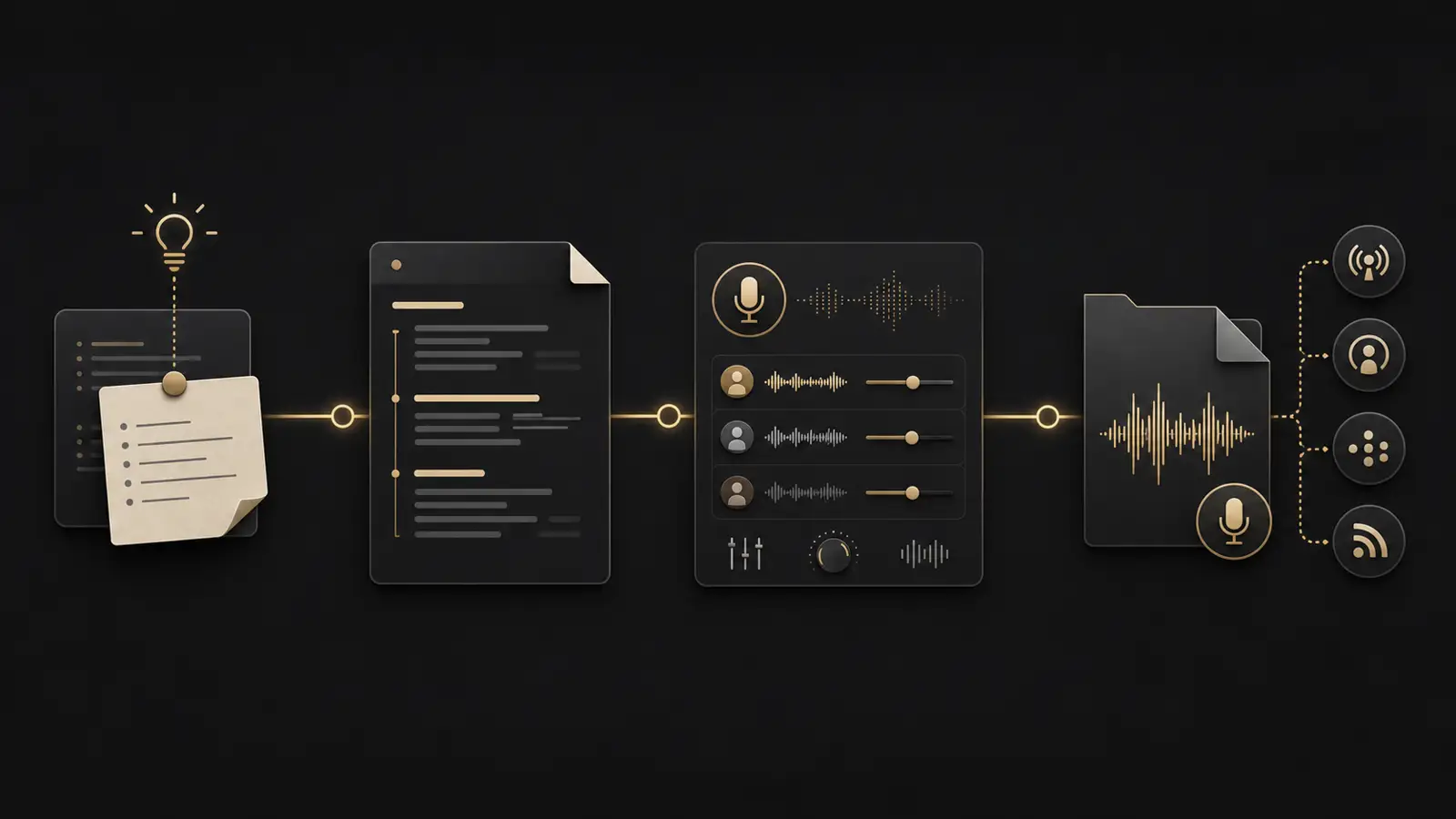
AI Podcast Generator Features for Faster Production
Move from written content to consistent narration.
Text-to-podcast conversion
Turn topics, text, Story321 writing, and PDFs into editable podcast scripts and reusable audio.
10 selectable AI voices
Create native two-host dialogue or solo narration without microphones or repeated recording sessions.
Multilingual audio creation
A multilingual podcast generator can prepare localized narration; every translation needs review.
Fast script iteration
With an AI podcast generator, revise introductions, transitions, and explanations in editable text.
Consistent narration
Keep a stable voice across recurring explainers while you focus on each episode’s quality and accuracy.
Downloadable audio output
Download MP3 or a ZIP containing audio, cover art, script, and Show Notes.
Why Use Story321 as Your AI Podcast Maker?
Reduce repetitive work while keeping facts and final approval in human hands.
Create without a recording setup
An AI podcast generator produces narration without microphones or a quiet studio for every update.
Repurpose useful written content
Text to podcast production turns researched guides, lessons, announcements, and stories into accessible audio.
Test ideas before full production
Use the AI podcast generator to test a concept before investing in guests or full production.
Make revisions more predictable
Update the source and generate another version instead of recreating a complete performance.
AI Podcast Generator vs. Traditional Recording
Choose the workflow that fits your episode and resources.
| Features | Story321 AI narration workflow | Traditional Recorded production |
|---|---|---|
Recording setup | Browser-based | Microphone and room |
Narration revisions | Edit and regenerate | Record another take |
Human performance | AI voice | Host or actor |
Best suited to | Repeatable narration | Live conversation |
Who Can Use an AI Podcast Generator?
Create audio for audiences who prefer listening.
Educators and course creators
An AI podcast generator turns reviewed lessons and course updates into repeatable educational narration.
Writers and storytellers
The AI podcast maker turns essays and stories into audio while helping writers test spoken rhythm.
Marketing teams
The AI podcast generator turns approved reports and updates into narration that is easy to revise.
Independent podcasters
Create solo explainers or prototypes, while reserving human recording for interviews and performances.
Newsletters and publishers
Offer selected written content as audio after reviewing names, quotations, dates, and context.
Global content teams
A multilingual podcast generator prototypes localized audio; native reviewers approve language and meaning.
Tools to Use with the AI Podcast Generator
Build the script, narration, and supporting artwork.
Publishing guidance
Prepare Your AI Voice Podcast for Distribution
Check platform requirements
Confirm current submission rules.
Prepare a valid feed
Use a valid feed workflow.
Review rights and accuracy
Verify the script and rights.
AI Podcast Generator FAQ
Answers about scripts, voices, editing, rights, and publishing.
How does an AI podcast generator create an episode?
Story321 builds an editable script from your topic or source, synthesizes the selected voices, and produces downloadable MP3 audio. It does not host an RSS feed.
Can I turn an article or script into a podcast?
Yes. Rewrite visual references for listening. The AI podcast generator reads your edited source.
Does the AI podcast generator support multiple speakers?
Yes. Story321 supports native two-host dialogue with separate voices, plus a solo narration mode.
Can I create podcasts in different languages?
A multilingual podcast generator speeds localization. A fluent reviewer checks translation and pronunciation.
Do I still need to edit AI-generated podcast audio?
Yes. Check pacing and facts. Edit music separately after the AI podcast generator creates narration.
Can I publish the generated audio commercially?
Review Story321’s terms and model license. You remain responsible for rights and platform rules.
Will Story321 publish my podcast automatically?
No. The AI podcast generator creates audio. Hosting, feeds, and distribution are separate.
Create Your Next Episode with an AI Podcast Generator
Bring a topic, Story321 work, pasted text, or PDF. Edit the script, choose two hosts or a narrator, and export a complete episode pack.
Review every AI podcast generator output before publishing.